3.1User accounts, rights & permissions
Administration begins with a single question: who can do what? Every user has an account, and every account carries rights (what it may do on the system) and permissions (what it may do to specific files and folders). The rule that should guide every decision is least privilege: grant only what is necessary. Users work in standard accounts; administrator rights are separate, deliberate and rare. Limited rights contain the damage of a mistake or a compromise — a standard account simply cannot silently reconfigure the whole machine.
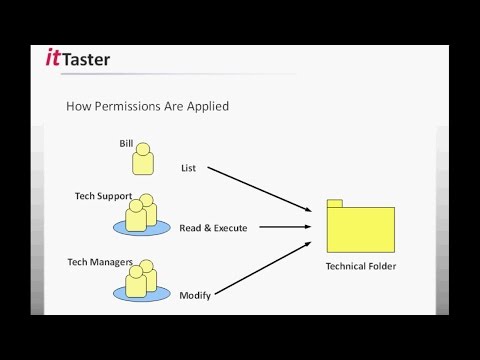
On files and folders, permissions decide read, write, modify or full control, for users or — far better — groups. Assigning permissions to groups rather than individuals is what keeps access manageable as people join, move and leave: you change a person's group membership, not a thousand scattered entries. Two more habits matter: understand how permissions inherit down a folder tree (so a change high up ripples below), and document who has access to what. Get this layer right and everything above it — the directory, group policy, the cloud — becomes safer, because it all rests on disciplined accounts and permissions.
Section vocabulary
- Account
- A user's identity on a system, carrying rights and permissions.
- Rights vs permissions
- Rights are what an account may do on the system; permissions are what it may do to specific files and folders.
- Least privilege
- Granting only the access strictly necessary, so damage from error or compromise stays contained.
- Group
- A collection of users given permissions together, so access scales and stays maintainable.
- Inheritance
- The way permissions set on a folder flow down to the items inside it.
Which principle should guide granting rights?
In practice — Design access by least privilege
- Take three roles (e.g. staff, manager, IT) and list what each genuinely needs to access.
- Create groups for those roles and grant folder permissions to the groups, not to individuals.
- Confirm ordinary users are standard accounts, with admin rights held separately.
- Check how permissions inherit down one folder tree, and note who has access where.
Key takeaways
- Least privilege everywhere: grant only what is needed; users are standard, not admin.
- Rights act on the system; permissions act on files and folders.
- Assign permissions to groups, not individuals, so access scales as people change.
- Understand inheritance and document who can access what.
Frequently asked questions
Why not give everyone admin rights to avoid annoying permission prompts?
Because the prompts are the cheap part; the damage they prevent is the expensive part. An admin account can install anything, change any setting and reach any file, which means a single mistake, a phishing click or a piece of malware running under that account can compromise the whole machine or spread across the network. Standard accounts contain that risk: day-to-day work does not need admin rights, so removing them costs users almost nothing while dramatically shrinking what can go wrong. Reserve administrator access for specific tasks, elevate deliberately, and you trade a few prompts for a far smaller blast radius.
Groups or individual users for permissions — does it really matter at small scale?
It matters sooner than you expect. Even a handful of people generate constant change: someone joins, changes role, or leaves, and with per-user permissions each event becomes a manual hunt across many folders, which drifts out of sync and leaves orphaned access behind. Group-based permissions turn all of that into one action — add or remove the person from a group — and make access auditable at a glance. Starting group-based while you are small is effortless; retrofitting it once permissions are tangled is painful. The habit pays off immediately and scales for free.